
Eye coordination problems occur when your eyes are unable to work together effectively during close tasks. Excessive screen use doesn’t necessarily cause these problems, but it can worsen existing binocular vision problems and make symptoms more noticeable.
Constant, close focusing, infrequent blinking, and poor visual habits contribute to eye discomfort and fatigue. Fortunately, early diagnosis and personalized vision therapy can help improve eye coordination and reduce these symptoms.
Eye coordination problems occur when both eyes struggle to work together efficiently during near tasks. Excessive screen use doesn’t necessarily cause these conditions, but it can worsen existing binocular vision disorders and make symptoms more noticeable.
Continuous near focusing, reduced blinking, and poor visual habits contribute to eye discomfort and fatigue. Fortunately, early diagnosis and personalized Vision Therapy can help improve eye coordination and reduce these symptoms.
What Are Eye Coordination Problems?
Eye coordination problems are binocular vision disorders in which the eyes are unable to work together as a team. Instead of comfortably focusing on the same object, the eyes have difficulty maintaining the correct position, making reading, computer work, and other close tasks difficult.
Conditions such as Convergence Insufficiency and accommodative dysfunction are common examples. These problems can affect children and adults alike, leading to visual discomfort and reduced daily performance.
How Does Screen Time Affect Eye Coordination?
Prolonged screen use requires constant concentration while reducing the frequency of natural blinking. Over time, this puts additional strain on the eye muscles responsible for maintaining correct eye position and focus.
Although screen time itself does not directly cause eye coordination problems, it can significantly worsen symptoms in people with existing binocular vision disorders. Regular visual breaks and proper ergonomics can help reduce digital eye strain.
7 Common Causes of Eye Coordination Problems During Screen Time
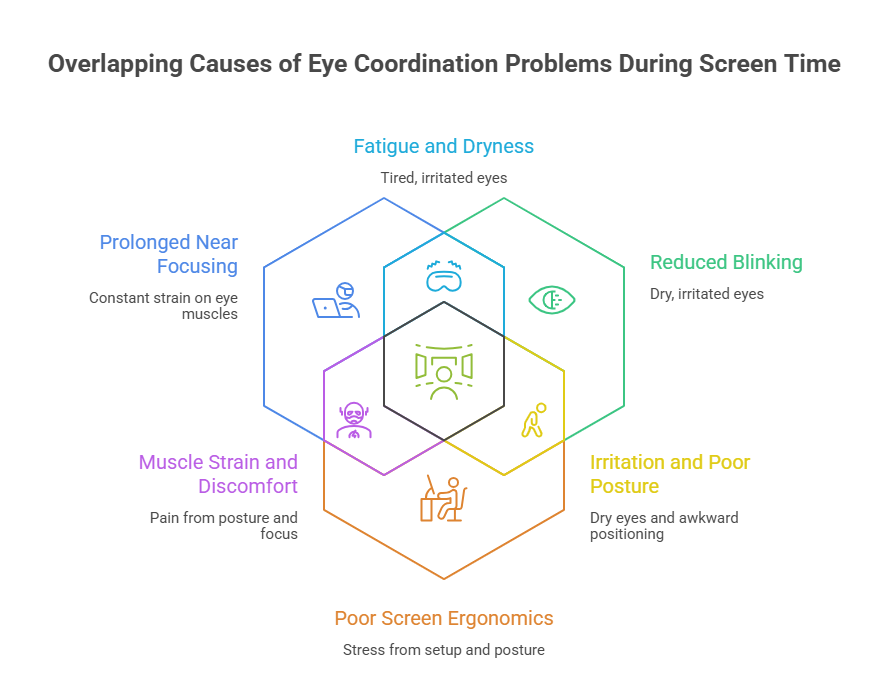
1. Prolonged Near Focusing
Spending long hours reading, working on a computer, or using a smartphone forces your eyes to focus continuously at a close distance.
This constant strain can fatigue your eye muscles, reduce eye coordination, and cause headaches, blurred vision, and eye fatigue, especially when using screens for long periods of time.
2. Reduced Blinking
People naturally blink less while using digital devices, causing the eyes to become dry, irritated, and uncomfortable.
Reduced blinking can worsen eye fatigue, blurred vision, and digital eye strain, and prolonged screen use can make existing eye coordination problems more pronounced.
3. Poor Screen Ergonomics
Incorrect screen positioning, poor posture, excessive screen glare, and improper viewing distance place extra stress on your visual system.
These factors make it more difficult for both eyes to work together efficiently, increasing discomfort and reducing visual performance throughout the day.
4. Existing Binocular Vision Disorders
People with binocular vision disorders, such as convergence insufficiency or ocular association disorders, often find their symptoms worsen with prolonged screen use.
Digital devices increase the demand on eye coordination, leading to headaches, double vision, eye strain, and difficulty maintaining focus.
5. Continuous Smartphone Use
Smartphones are usually held much closer to the eyes than computers or televisions.
This increased demand on eye convergence can overwork the eye muscles, resulting in visual fatigue, blurred vision, headaches, and reduced eye coordination after extended mobile device use.
6. Inadequate Visual Breaks
Using digital devices without taking regular breaks keeps the eye muscles under continuous strain.
Following the 20-20-20 rule, looking 20 feet away for 20 seconds every 20 minutes, helps relax the eyes, reduce fatigue, and improve visual comfort during screen time.
7. Uncorrected Vision Problems
Uncorrected refractive errors such as myopia, hyperopia, or astigmatism can make screen use more uncomfortable.
When combined with long hours of digital device use, these vision problems increase eye strain and may worsen symptoms of underlying eye coordination disorders.
Signs of Eye Coordination Problems and Their Best Treatment Options
| Symptoms of Eye Coordination Problems | Recommended Treatment |
| Frequent headaches during reading or screen use | Customized Vision Therapy to improve eye coordination and reduce visual strain |
| Blurred vision while focusing on near objects | Binocular Vision Training to improve eye teaming and clear vision |
| Double vision | Prism Lenses (when recommended) along with Vision Therapy for proper eye alignment |
| Eye strain and visual fatigue | Eye Coordination Exercises to strengthen eye muscles and reduce discomfort |
| Burning or watery eyes | Follow healthy screen habits and Vision Therapy if symptoms persist |
| Difficulty concentrating on reading or close work | Accommodation Training to improve focusing ability and visual efficiency |
| Words appearing to move while reading | Vision Therapy to enhance eye tracking and binocular vision |
| Neck and shoulder discomfort due to prolonged screen use | Ergonomic adjustments combined with regular visual breaks and Vision Therapy |
| Poor reading performance and reduced productivity | Home-Based Vision Therapy Programs with guided exercises to improve reading comfort |
| Difficulty switching focus between near and distant objects | Regular Progress Assessments and personalized Vision Therapy to restore comfortable focusing |
How to Prevent Eye Coordination Problems During Screen Time
You can reduce visual stress and protect your eyes by following these healthy habits:
- Follow the 20 – 20 – 20 Rule
- Blink more frequently while using screens
- Maintain proper posture
- Position your monitor at eye level and an appropriate viewing distance
- Adjust screen brightness and contrast
- Limit unnecessary screen time
- Spend more time outdoors
- Schedule regular comprehensive eye examinations
- Seek Vision Therapy if symptoms persist
These habits help reduce digital eye strain and improve long-term visual comfort.
When Should You Visit a Vision Therapy Specialist?
If you continue to experience headaches, blurred vision, double vision, difficulty concentrating, and eye strain even after reducing your screen time, it’s important to schedule a comprehensive binocular vision evaluation. Early diagnosis can help identify hidden eye coordination problems before they impact school performance, work productivity, and daily comfort.
At Dr. Abhinav Maharwal Vision Therapy Clinic, we provide advanced binocular vision assessments and personalized Vision Therapy programs designed to improve eye coordination, reduce digital eye strain, and help both children and adults achieve comfortable, efficient vision.
Conclusion
In today’s digital world, prolonged screen time can reveal underlying eye coordination problems that should not be ignored. Early diagnosis, healthy visual habits, and personalized Vision Therapy can significantly improve eye coordination, reduce eye strain, and enhance everyday visual comfort.
At Dr. Abhinav Maharwal Vision Therapy Clinic, we offer comprehensive binocular vision assessments, Vision Therapy, myopia management, pediatric vision care, lazy eye (amblyopia) treatment, squint eye management, eye coordination therapy, and specialty contact lenses.
Book a consultation to receive expert care and a customized treatment plan for better, healthier vision.
FAQ’s
Screen time does not directly cause eye coordination problems, but prolonged digital device use can worsen symptoms in people with existing binocular vision disorders.
Symptoms include headaches, blurred vision, double vision, eye strain, difficulty reading, poor concentration, and eye fatigue after screen use.
Excessive screen time may increase visual fatigue and make underlying eye coordination problems more noticeable in children.
Customized Vision Therapy is one of the most effective treatments for improving eye coordination and binocular vision.
Follow the 20-20-20 rule, blink frequently, adjust your workstation ergonomics, and take regular breaks.
Yes. Vision Therapy can help adults improve eye coordination, reading comfort, and workplace productivity.
A comprehensive binocular vision assessment evaluates eye teaming, focusing ability, eye movements, alignment, and depth perception.
If you experience persistent headaches, blurred vision, eye strain, or difficulty focusing during screen use, consult a vision therapy specialist.
Yes. These problems can reduce reading speed, concentration, learning ability, and productivity.
Dr. Abhinav Maharwal offers evidence-based binocular vision assessments and customized Vision Therapy programs to improve eye coordination, reduce symptoms, and enhance overall visual performance for children and adults.